
Home
Other Apps And Panels
TiviGlass 2.3.1 IS HERE — ALL FEATURES UNLOCKED, ULTRA-SIMPLE PANEL, NEW SIDE MENU, SMARTER PLAYER & SNAPIER REMOTE — THE ULTIMATE TiviGlass
DOWNLOAD
TiviGlass 2.3.1 IS HERE — ALL FEATURES UNLOCKED, ULTRA-SIMPLE PANEL, NEW SIDE MENU, SMARTER PLAYER & SNAPIER REMOTE — THE ULTIMATE TiviGlass
1 hour ago
8 views

Administrator
540
Posts
1,753
Likes
Achievements
VIP ClubFamousContributorPopularRegularLikedFirst StepNewcomer
Thread Post
Oct 8, 2026
at
9:15 PM
⚡ TiviGlass 2.3.1 is out ⚡
New side menu • New player controls • Match listings
A big look-and-feel update with a much snappier remote.
🎨 NEW LOOK
New side menu: every entry fits on one screen, with Settings and Exit always at the bottom. The card at the top shows who's watching and which TV service is on, so you can switch profile or service without going into Settings.
New player controls: one band across the bottom with what's on and the clock, progress and what's next, and named buttons underneath. On live TV you get rewind, play/pause, fast-forward, Favourite, Info, Record and More. On films and episodes, Sound, Subtitles and More.
Know when you're behind live: after a pause or rewind, the controls show BEHIND LIVE and how far behind you are. One press on Live (red dot) takes you back.
Sound info on the player's info line: shows the format, e.g. DD+ 5.1 or AAC Stereo. You can also swap exact resolution for a label like HD or UHD in Settings > While watching > Player controls & clock.
Sound timing in the player: More > Sound now has audio tracks, Fix sound and Earlier/Later timing together, per channel or title.
📺 MATCH LISTINGS (FREE ON EVERY PLAN)
Choose where a channel's programme listings come from: hold OK on a channel in the guide, press More while watching, or open its options in Search.
The closest matches come first, with what each one has on over the next few hours so you can compare it with what's actually airing. Press OK and the guide row fills straight away.
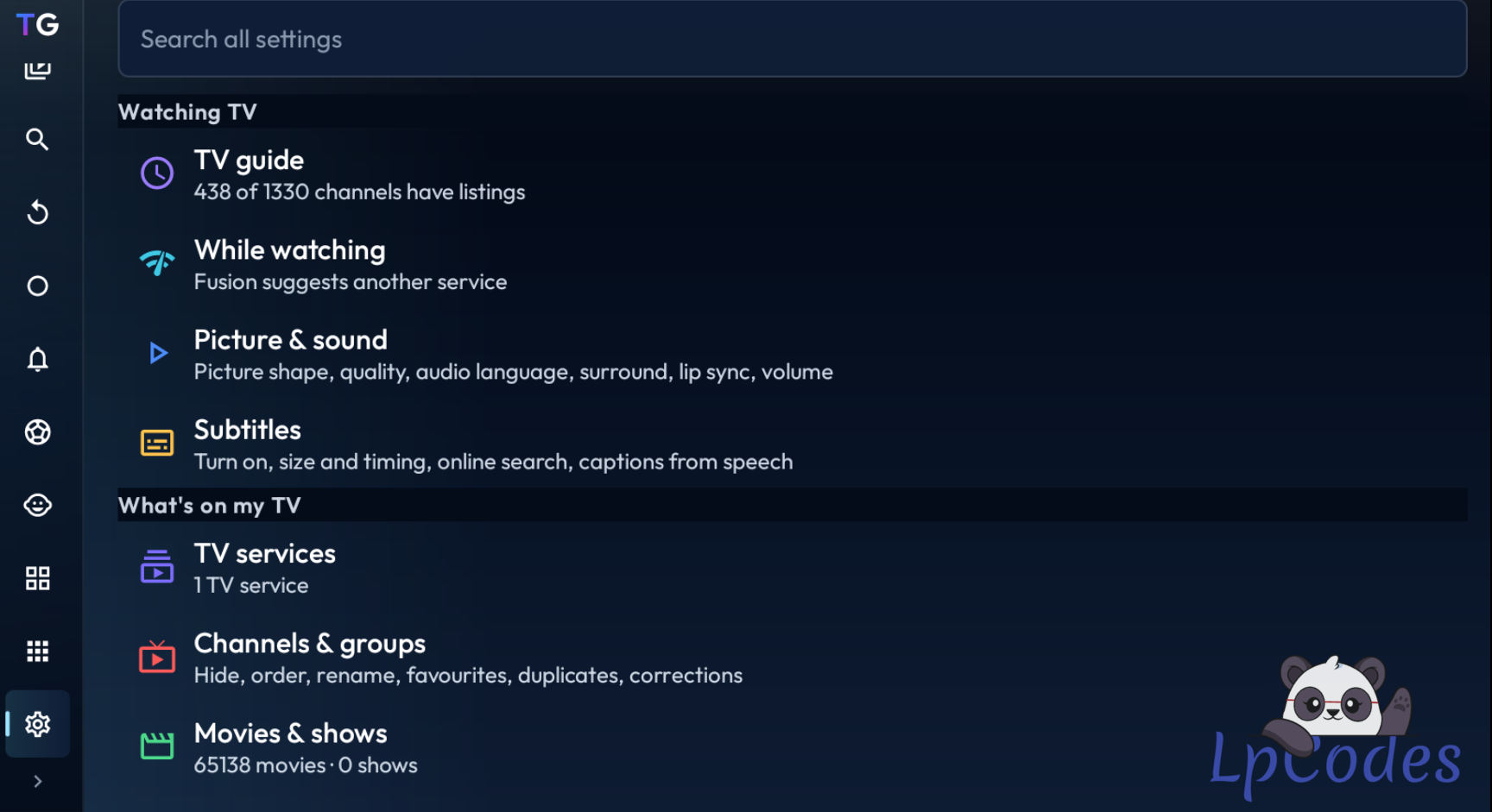
Fix every channel at once in Settings > TV guide > Missing listings. Channels with no listings come first with scored suggestions. Accept all takes every best suggestion at or above the score you choose. You can also keep a row blank on purpose, or hand a channel back to automatic matching.
🎬 MOVIES & SHOWS (TV)
New panel beside the posters: smaller posters fit more on screen, the panel describes the one you're on, and OK moves into it so you can play, resume, or add to favourites, watchlist or groups. Prefer one press? Set Select on a poster to Opens the title in Settings > Movies & shows > Browsing.
New show page: seasons, episodes and the highlighted episode side by side, opening on the episode you watched last.
New movie page: Play, Resume, Play from start, and Watch the trailer when your service has one.
🗂️ ORGANISATION & CUSTOMISATION
Channels & groups is now one full screen with Show & hide, Arrange, Rename and Tidy up.
New groups arrive hidden: turn it on in Tidy up and groups your provider adds later stay hidden, so a tidy guide stays tidy (free on every plan).
Customise Home: show, hide and arrange rows with a live mini-map, choose what TiviGlass opens on, or pick a ready-made layout: Balanced, Live TV first, Movies & shows first, or Just the essentials.
Customise Sports and follow your teams: following is free. Your teams get a star and their own row at the top, and their matches come first. With Essentials or Premium you can also record every match. Teams are picked up from the title or subtitle, so listings like "Kansas City Chiefs at Buffalo Bills" work too.
━━━━━━━ ⚡ ━━━━━━━
Let me know what you think, and report any bugs in the thread!
Fuzepper is an international service for safe file transfer, storage, backup, and distribution.
👍
juniorid
Similar Threads
10 months ago
1,042
10 months ago
1,016
10 months ago
1,745
10 months ago
1,201
10 months ago
1,900