
Moderator
146
Posts
280
Likes
Achievements
VIP ClubContributorPopularRegularNewcomerLikedFirst Step
Thread Post
May 29, 2026
at
11:26 PM
i would like to thank Fuzepper for giving me a tool for creating good stuff it was easier to be fair i use chatgpt most of the time but this plugin is sick i managed to do what i wanted so thank you my mate pic to show 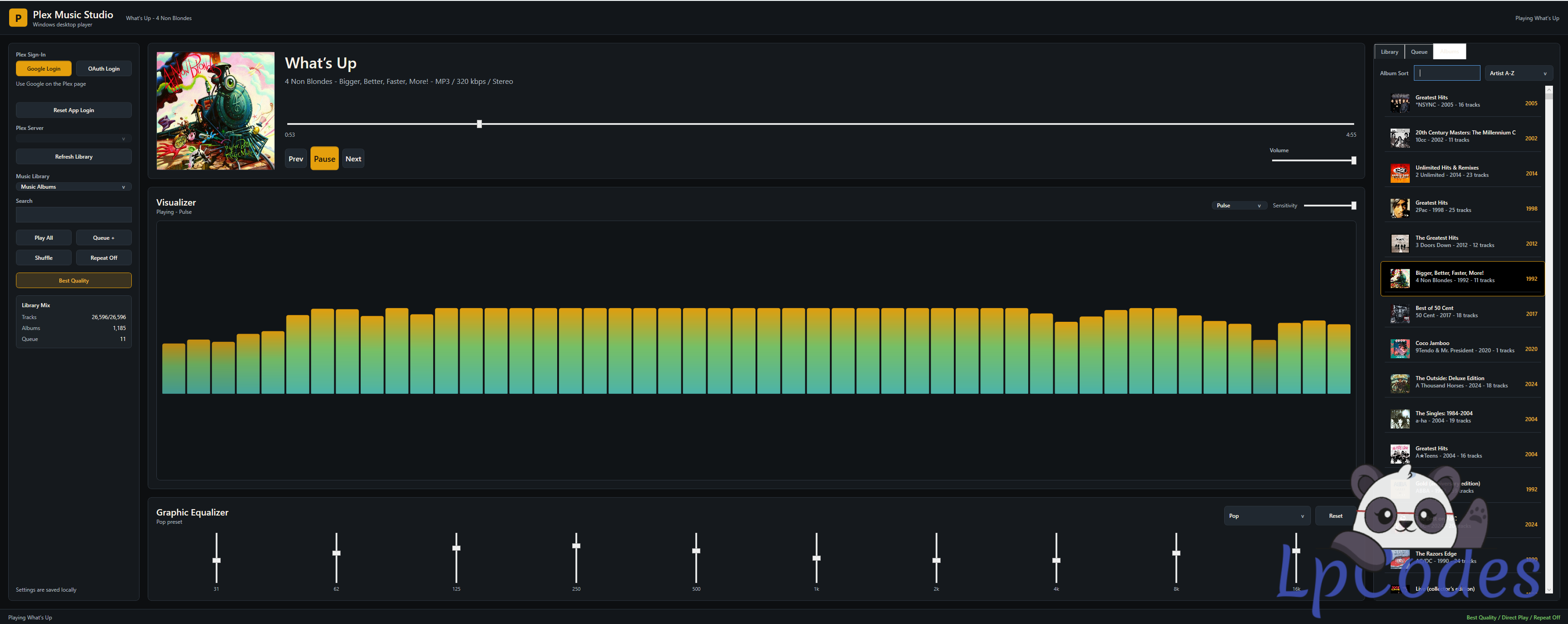
if anyone wants to test this feel free as long as you have plex and music folders this connects via plex pins
and is 100% portable
## Connect With Plex PIN
The app now uses Plex PIN login only.
1. Click `Connect with PIN`.
2. Go to `plex.tv/link` in your browser.
3. Enter the PIN shown in the app.
4. Sign in to any Plex account you want to use.
5. Return to the app and it will discover that account's Plex music libraries automatically.
The Plex server selector, manual server URL, and token fields are hidden from the interface. The app still uses Plex server discovery internally so it can find the music servers available to the Plex account you linked with the PIN. It is not hardcoded to one account or one IP address.
To switch accounts, click `Reset App Login`, then connect again with a new PIN.
The portable app saves local settings beside the app in:
`Data\settings.json`
If the app folder is not writable, it falls back to:
`%APPDATA%\PlexMusicWin\settings.json`
## Final Build Features
- PIN-only Plex account connection
- Automatic Plex music server and library discovery
- Hidden server and token handling
- Track, album, and queue views
- Track search and album search
- Album sorting by year old-to-new, year new-to-old, artist, or album
- Album artwork in the now-playing panel and track/album lists
- Queue management with play queue, clear queue, and add selected
- Shuffle, repeat, previous, play/pause, next, progress seek, and volume controls
- Click or drag anywhere on the progress bar to seek
- Best Quality mode to prefer the highest quality audio file Plex exposes
- 10-band graphic equalizer panel with presets
- Dedicated NAudio playback engine
- Live FFT spectrum analysis from the playing audio stream
- Plexamp-style visualizer with glow, reflection, and album-cover colours
- Visualizer modes: Plexamp, Waveform, Pulse, and VU Meter
- Player theme changes to match the playing album cover
- Saved settings for login state, library, volume, shuffle/repeat, EQ, visualizer mode, and sensitivity
- Portable local `Data` folder for settings
- Scales down better for different Windows screen resolutions
## Playback Notes
Playback uses Plex Direct Play URLs through the app's dedicated NAudio engine and Windows Media Foundation, so supported formats depend on the codecs available to Windows on the PC.
MP3, AAC, and most common music formats should work. Unusual formats may need conversion in Plex or a Windows codec.
The equalizer presets currently shape the visual spectrum and are saved with the app. The new audio engine also gives the app real playback samples for the visualizer instead of simulated movement.
if anyone wants to test this feel free as long as you have plex and music folders this connects via plex pins
and is 100% portable
## Connect With Plex PIN
The app now uses Plex PIN login only.
1. Click `Connect with PIN`.
2. Go to `plex.tv/link` in your browser.
3. Enter the PIN shown in the app.
4. Sign in to any Plex account you want to use.
5. Return to the app and it will discover that account's Plex music libraries automatically.
The Plex server selector, manual server URL, and token fields are hidden from the interface. The app still uses Plex server discovery internally so it can find the music servers available to the Plex account you linked with the PIN. It is not hardcoded to one account or one IP address.
To switch accounts, click `Reset App Login`, then connect again with a new PIN.
The portable app saves local settings beside the app in:
`Data\settings.json`
If the app folder is not writable, it falls back to:
`%APPDATA%\PlexMusicWin\settings.json`
## Final Build Features
- PIN-only Plex account connection
- Automatic Plex music server and library discovery
- Hidden server and token handling
- Track, album, and queue views
- Track search and album search
- Album sorting by year old-to-new, year new-to-old, artist, or album
- Album artwork in the now-playing panel and track/album lists
- Queue management with play queue, clear queue, and add selected
- Shuffle, repeat, previous, play/pause, next, progress seek, and volume controls
- Click or drag anywhere on the progress bar to seek
- Best Quality mode to prefer the highest quality audio file Plex exposes
- 10-band graphic equalizer panel with presets
- Dedicated NAudio playback engine
- Live FFT spectrum analysis from the playing audio stream
- Plexamp-style visualizer with glow, reflection, and album-cover colours
- Visualizer modes: Plexamp, Waveform, Pulse, and VU Meter
- Player theme changes to match the playing album cover
- Saved settings for login state, library, volume, shuffle/repeat, EQ, visualizer mode, and sensitivity
- Portable local `Data` folder for settings
- Scales down better for different Windows screen resolutions
## Playback Notes
Playback uses Plex Direct Play URLs through the app's dedicated NAudio engine and Windows Media Foundation, so supported formats depend on the codecs available to Windows on the PC.
MP3, AAC, and most common music formats should work. Unusual formats may need conversion in Plex or a Windows codec.
The equalizer presets currently shape the visual spectrum and are saved with the app. The new audio engine also gives the app real playback samples for the visualizer instead of simulated movement.
👍❤️
Mike28, tigersfan, Fuzepper


Administrator
528
Posts
1,680
Likes
Achievements
VIP ClubFamousContributorPopularRegularLikedFirst StepNewcomer
Reply
May 30, 2026
at
9:10 AM
Good job, i'm almost ready with the plex app 😃.
Fuzepper is an international service for safe file transfer, storage, backup, and distribution.
❤️
tigersfan, deed1001
Administrator
528
Posts
1,680
Likes
Achievements
VIP ClubFamousContributorPopularRegularLikedFirst StepNewcomer
Reply
May 31, 2026
at
7:01 PM
deed1001 wrote
will look in to it mate but first i will let @Fuzepper make is creation
I've reached the AI limit, so I'll have to continue later. 😅
Fuzepper is an international service for safe file transfer, storage, backup, and distribution.
😂
deed1001, tigersfan
Similar Threads
9 months ago
566

9 months ago
411
9 months ago
540
8 months ago
778
8 months ago
569