

Administrator
System Administrator
305
Posts
1,208
Likes
Achievements
VIP ClubFamousRegularFirst StepContributorLikedPopularNewcomerLoyal
Thread Post
Dec 15, 2025
at
11:33 PM
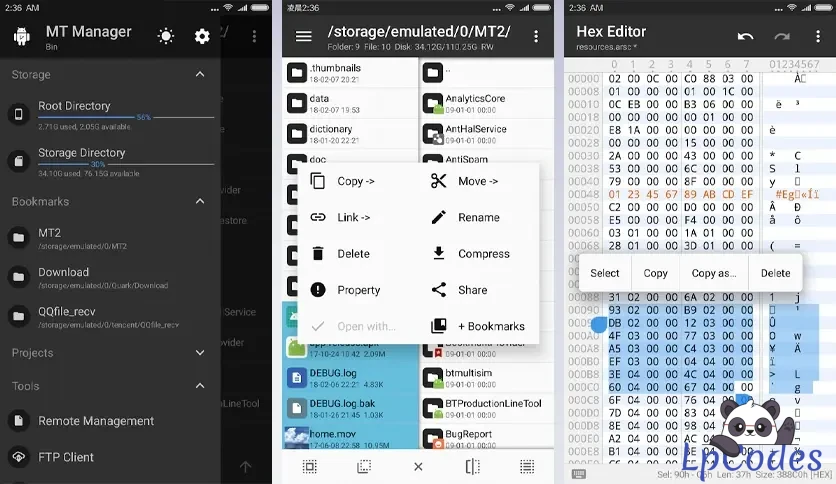
MT Manager is one of the most popular APK file editors for Android. To take full advantage of this app, you'll need to have root permissions. With superuser permissions, you will be able to modify user and system apps. When editing these apps, you can edit Dex, ARSC and XML code, as well as optimize, clone and sign apps, remove verifications and even add translations. Thus, you can delete unnecessary files from an app and gain storage space.
In addition to modifying apps, MT Manager has a file explorer feature. As it requires root permissions to leverage all its features, MT Manager also lets you access system folders that are normally hidden if the device is not rooted. You'll be able to mount system folders and modify file permissions and ownership.
MT Manager also lets you to create and extract compressed files in ZIP format. You can even access their contents without having to unzip them. You can also view images, listen to music, edit text, run scripts, access an FTP connection from your device and many more.
It should be noted that this tool is only recommended for advanced users, since any change made to an app can cause it to stop working and generate issues on the device. If are confident and sure of what you are doing, you can download the APK from MT Manager.

Beginners Guide to modding the Xciptv 5.0.1. I posted. This is a hard coded version meaning the server url will be saved in the app itself so only the username and password needs t be added by the end user.
Things you will need:
Step 1. On your android device Open up the Mt manager and click on the apk of the xciptv or any other app that you downloaded and choose View.

Step 2. You should now be able to see the files inside the app. Click on “Classes.dex”

Step 3. A window should appear on the screen that says “open with”. Choose “Dex Eedtor plus”.

Step 4. Select both “classes.dex” and “classes2.dex” and press ok

Step 5. In the explorer tab of Dex Editor plus Select the folder labeled as “com”

Step 6. Click on the sub-folder named “nathnetwork.xciptv”

Step 7. Scroll Down until “loginActivity is visible

Step 8 Click loginActivity

Step 9. After the file is opened, Click on menu button which looks like 3 dots and choose search.

Step 10. In the box labeled a find type “yourdns” and click next. You will then be at the line that needs t be edited with your iptv server url. Don’t edit outside the open and closed quotes “ “.

Step 11. Enter your server url within the quote. Pay attention to weather it should be http or https and if it has a specific port number make sure its included.

Step 12. After adding the server url click on the save icon. Then click on the back button on your android device to exit the loginActivity file.

Step 13. You are going to click the back button again to exit dex files. Yu will get a prompt to compile and save the dex files. Chose “save and exit”

Step 14. After The dex files have been saved you will get a prompt informing you that “class2 dex” has been modified and it will ask if yu want to update it. Make sure auto sign box has a check mark. And press ok.

Step 15 you can now exit the MT manager app and install your newly saved apk. The default location should be mt2 folder on your device.

You can use this instructions with any app.
In addition to modifying apps, MT Manager has a file explorer feature. As it requires root permissions to leverage all its features, MT Manager also lets you access system folders that are normally hidden if the device is not rooted. You'll be able to mount system folders and modify file permissions and ownership.
MT Manager also lets you to create and extract compressed files in ZIP format. You can even access their contents without having to unzip them. You can also view images, listen to music, edit text, run scripts, access an FTP connection from your device and many more.
It should be noted that this tool is only recommended for advanced users, since any change made to an app can cause it to stop working and generate issues on the device. If are confident and sure of what you are doing, you can download the APK from MT Manager.
Beginners Guide to modding the Xciptv 5.0.1. I posted. This is a hard coded version meaning the server url will be saved in the app itself so only the username and password needs t be added by the end user.
Things you will need:
- An Android Device
- Mt Manager
Use this app for testing but you can use any app. -->
Step 1. On your android device Open up the Mt manager and click on the apk of the xciptv or any other app that you downloaded and choose View.
Step 2. You should now be able to see the files inside the app. Click on “Classes.dex”
Step 3. A window should appear on the screen that says “open with”. Choose “Dex Eedtor plus”.
Step 4. Select both “classes.dex” and “classes2.dex” and press ok
Step 5. In the explorer tab of Dex Editor plus Select the folder labeled as “com”
Step 6. Click on the sub-folder named “nathnetwork.xciptv”
Step 7. Scroll Down until “loginActivity is visible
Step 8 Click loginActivity
Step 9. After the file is opened, Click on menu button which looks like 3 dots and choose search.
Step 10. In the box labeled a find type “yourdns” and click next. You will then be at the line that needs t be edited with your iptv server url. Don’t edit outside the open and closed quotes “ “.
Step 11. Enter your server url within the quote. Pay attention to weather it should be http or https and if it has a specific port number make sure its included.
Step 12. After adding the server url click on the save icon. Then click on the back button on your android device to exit the loginActivity file.
Step 13. You are going to click the back button again to exit dex files. Yu will get a prompt to compile and save the dex files. Chose “save and exit”
Step 14. After The dex files have been saved you will get a prompt informing you that “class2 dex” has been modified and it will ask if yu want to update it. Make sure auto sign box has a check mark. And press ok.
Step 15 you can now exit the MT manager app and install your newly saved apk. The default location should be mt2 folder on your device.
You can use this instructions with any app.
🔥 Welcome to the Ultimate IPTV Community! 🔥
🔥 LpCodes Scripts - The #1 Place for IPTV Enthusiasts! 🔥
📢 Follow the Rules & Stay in the Game! 🚀
🔥 LpCodes Scripts - The #1 Place for IPTV Enthusiasts! 🔥
📢 Follow the Rules & Stay in the Game! 🚀
👍
dooks, gustavo, madmaxqs2026 and 11 others

Similar Threads
10 months ago
1,156
10 months ago
608
10 months ago
536

10 months ago
521
7 months ago
424